Until now, your loyalty program ran on a single, flat earning rule: every customer earned points the same way, on every order. It worked, but it forced a one-size-fits-all setup that never quite matched how you actually run promotions.
That changes today. Keystone Loyalty Rewards now lets you build multiple conditional earning rules with a clear, sentence-driven builder — so customers earn points exactly the way you decide.
Set conditions. Choose rewards.
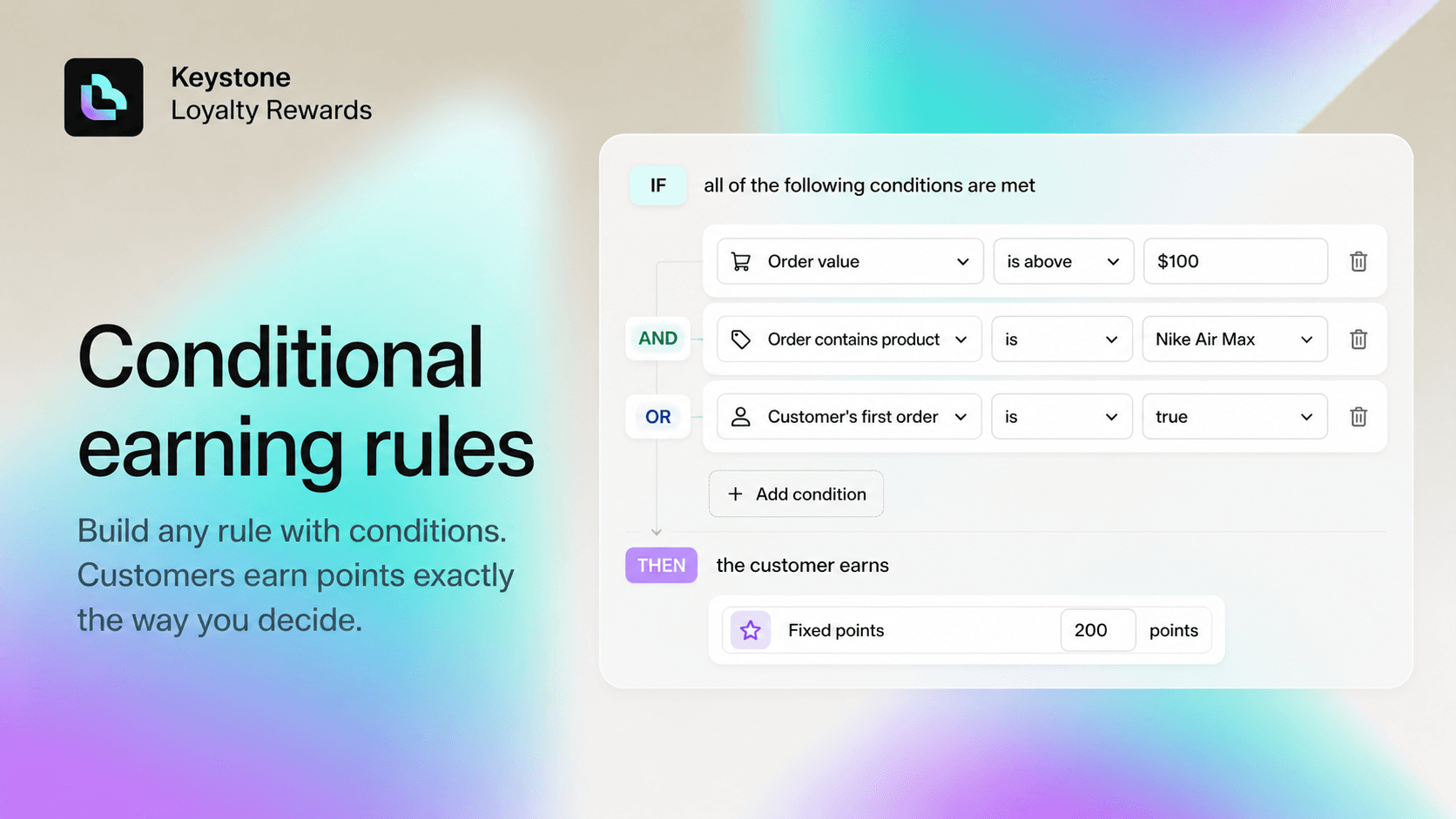
Every rule reads like a sentence: IF a set of conditions is met, THEN the customer earns a reward. You compose each rule from simple pickers — no code, no developer required.
Conditions you can build with:
- Order value — when the order total is above, below, or between an amount.
- Number of items — when the basket has more (or fewer) than N items.
- Specific products or collections — when the order contains a chosen product or a product from a collection (Shopify smart collections supported).
- Exclusions — when the order does not contain a given product or collection.
- Purchase type — one-time, subscription, or both.
- First order — when it is the customer's very first purchase.
Combine conditions with AND / OR to match your exact promotional strategy, and choose how points are awarded: a fixed bonus (e.g. +50 points), points per currency, or a multiplier (e.g. 2× base points).
Real examples in seconds
- High-value skincare bonus: IF order value is above $100 AND order contains a product from the Skincare collection → earn 2 points per $1.
- Reward bigger baskets: IF the order has more than 5 items → +100 bonus points.
- Welcome new customers: IF it is the customer's first order → 2× points.
- Protect your margins: IF the order does not contain anything from the Clearance collection → earn points as normal.
To get going fast, the builder ships with quick-start presets — big order bonus, more items bonus, specific product bonus, first-order welcome — so you can start from a template and tweak.
Preview before you publish
A built-in points calculator lets you construct an example order and instantly see how every active rule contributes to the final total, including which rules were triggered. Adjust the rule or the order and the breakdown updates live — so you go live with confidence, not guesswork.
Built to be safe and backward compatible
- Shops that never open the builder keep their existing earning behaviour, exactly as before — there is no migration and nothing to clean up.
- Each rule has its own on/off toggle, so you can run seasonal promotions or A/B tests without touching the rest of your setup.
- All points for an order are still credited in a single transaction, so refunds stay proportional and your ledger stays clean.
Get started
Open Earn points → Order earning rules, switch the card to Advanced, and start building. Your first rule mirrors your current setup, so you can layer new conditional rules on top without losing anything.
Build any earning rule you want — and let your loyalty program finally match the way you run your store.
Related reading
- Meet Sidekick: Ask Your Shopify Loyalty Program Anything, in Plain Language
- Introducing Custom Earning Rules: Reward Page Visits and Shopify Flow Events
- How to Build a Loyalty Program That Truly Scales
Ready to put this into practice? Keystone Loyalty & Rewards launches points, VIP tiers and referrals in minutes — VIP tiers at a third of what the big-name apps charge, a done-for-you setup option, and a free plan to start.