Until now, customers could only earn points through the built-in earning rules the app ships with — orders, signups, birthdays, social follows, and so on. Useful, but fixed. If you wanted to reward something specific to your store, or connect points to an automation you already run, there was no way to do it.
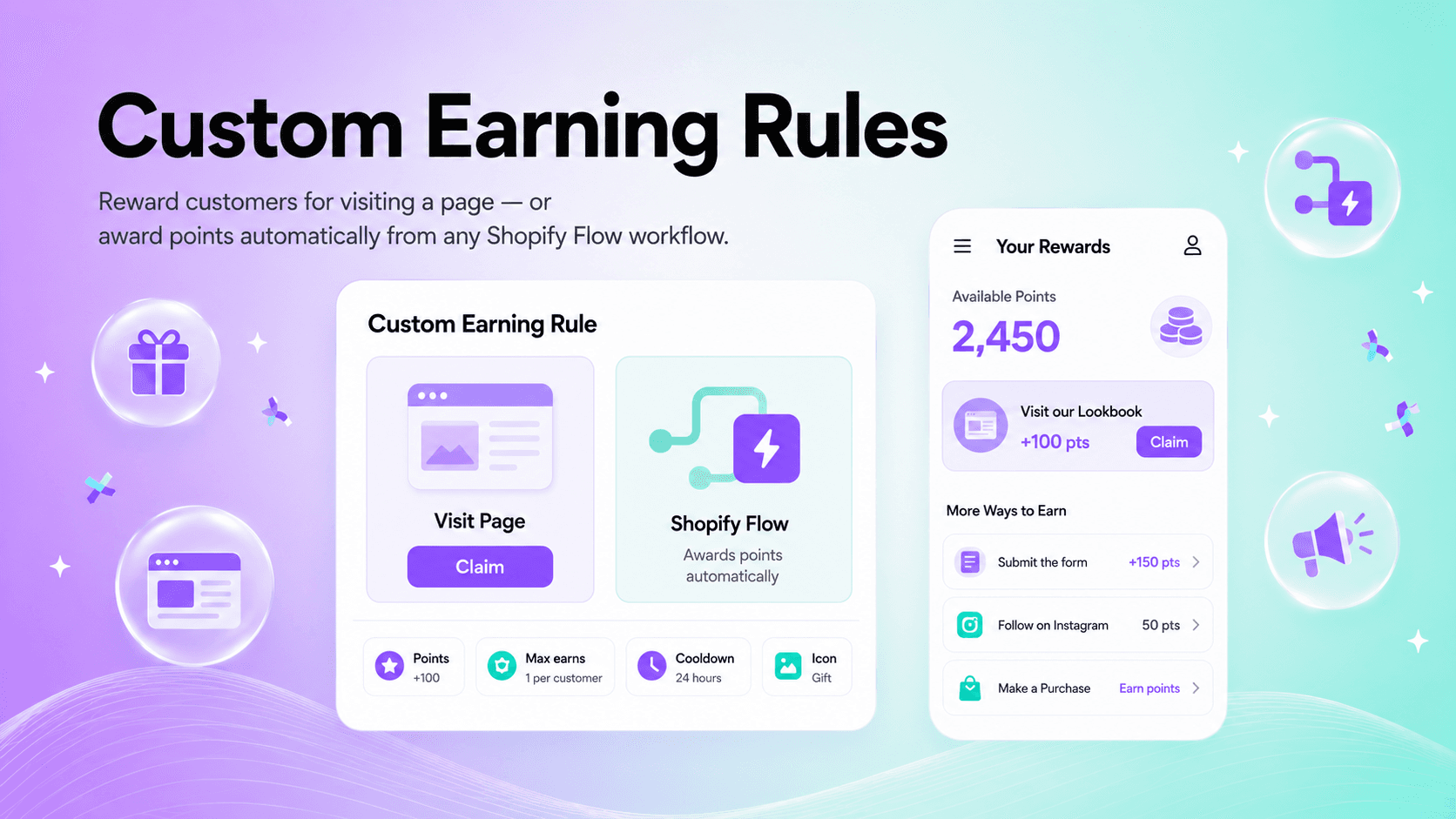
Custom Earning Rules — the newest earning type in Keystone Loyalty Rewards — change that. You can now define your own earning rule and award points in two ways: when a customer visits a chosen page on your storefront, or when a Shopify Flow workflow runs. Both show up consistently everywhere your customers already see loyalty — the storefront widget, the Customer Account UI, and your theme app blocks.
Why we built this
Points could previously only be earned through predefined, built-in rules. There was no way for a merchant to define their own earning rule, and no way to award points from custom, event-driven sources like Shopify Flow automations.
The goal was a single, flexible rule you control, backed by one internal mechanism that produces and assigns points and enforces earning limits the same way no matter where the points come from. The result: you can reward page visits directly, or award points from Shopify Flow workflows, and customers see how to earn — and their up-to-date balance — consistently across every surface.
Two ways to earn
A custom earning rule currently supports two types.
Visit page
Reward customers for visiting a specific page of your storefront — a lookbook, a landing page, a size guide, whatever you want to drive traffic to. You pick the page from your own store; it is not an arbitrary external link. Customers see the rule with a Claim button they tap to earn the points.
Integration (Shopify Flow)
Award points from a Shopify Flow workflow. This type offers all the same options as Visit page, plus two extras: a description that explains how to earn in more detail, and an optional link shown as a button that takes the customer to where they earn — for example, the page that holds a form.
The actual point award is controlled by Shopify Flow. You'll need the Shopify Flow app installed, then you build a flow that includes our "Award custom earning rule points" action. Because Flow drives the award, the workflow and the rule should be enabled at the same time — if the flow is off, the rule is hidden so customers aren't shown a reward they can't currently earn.
What you can configure
For both types, you control:
- Title and icon shown on the customer-facing surfaces.
- Points awarded each time the rule is earned.
- Earning limits, enforced per customer — the maximum number of times a customer can be rewarded, and a minimum cooldown interval between earns.
- Storefront visibility — whether the rule is shown to customers at all.
Where customers see it
Custom earning rules appear consistently across the storefront widget, the Customer Account UI extension, and the theme app blocks. A Visit page rule shows a Claim button. An Integration rule with a link shows a button that opens the linked page, and Shopify Flow awards the points afterwards. An Integration rule without a link is shown for information only.
An example
Say you use HulkApps Form Builder, which exposes a "form submitted" trigger, and you want to reward customers for completing a survey. In the Shopify Flow app, you build a flow that listens for HulkApps' "form submitted" trigger and runs our "award custom earning rule points" action. Back in the loyalty app, you create an Integration rule and set the link to the store page that holds the form. Customers see the rule with a button that opens the form — and once they submit it, Flow awards the points automatically.
Because it works off any Shopify Flow trigger, the same pattern applies far beyond forms — including triggers exposed by other apps you already have installed.
Try it out
Open Keystone Loyalty Rewards in your Shopify admin, head to your earning rules, and create a new Custom Earning Rule. Start with a Visit page rule to reward traffic to a key page, or wire up a Shopify Flow workflow to turn an existing automation into loyalty points.
Install Keystone Loyalty Rewards for free right now.
Related reading
- How to Use Shopify Flow to Automate Loyalty Edge Cases
- How to Sell to Wholesale Customers Without Polluting Your Loyalty Program
- Build any earning rule you want with conditional earning logic
Ready to put this into practice? Keystone Loyalty & Rewards launches points, VIP tiers and referrals in minutes — VIP tiers at a third of what the big-name apps charge, a done-for-you setup option, and a free plan to start.