For most stores, the single biggest moment in the whole customer journey passes in silence. A shopper finishes checkout, points are quietly awarded in the background, and they land on a Thank you page that says nothing about the reward they just earned. The peak of purchase excitement — "I just bought something" — goes by without a single nudge back into your loyalty program.
Our checkout rewards block already closes that loop, but only on the checkout page itself, which is Shopify Plus only. That left most merchants with nothing on the post-purchase surface at all.
The new Points earned recap block for the Thank you page in Keystone Loyalty Rewards fixes exactly that.
Why we built this
The earning happened silently. There was no sign, at the moment of highest purchase excitement, that the customer had just been rewarded for buying — so the opportunity to reinforce the program and pull them back went unused. The Thank you page is available on every Shopify plan, yet most stores had nothing there.
The goal was a drop-in block that, right after purchase, shows a logged-in customer how many points they just earned on this order, why they earned them, and their current balance and tier — closing the loop at the exact moment it matters most.
What the customer sees
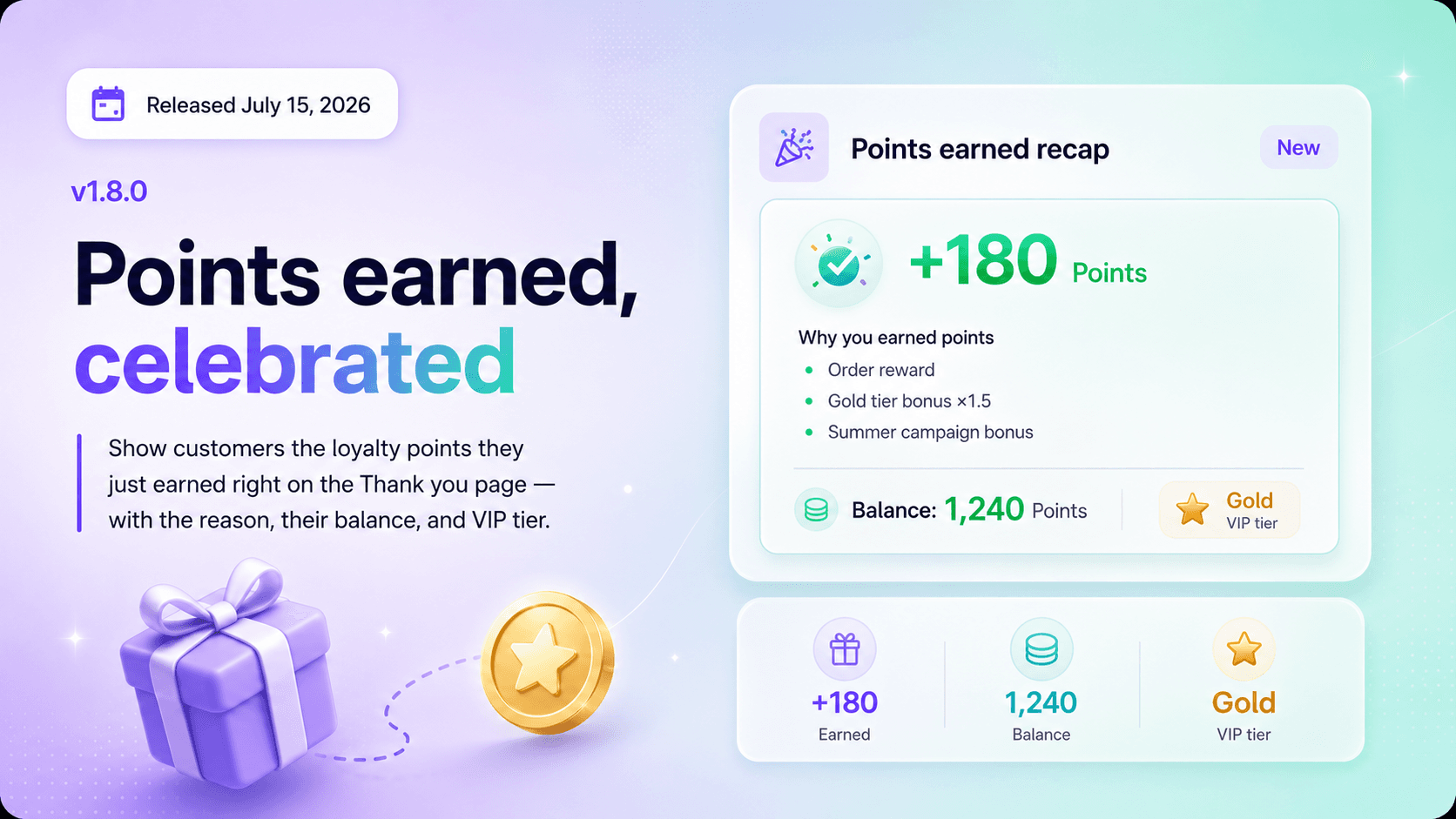
The moment a logged-in customer completes an order, the Thank you page shows a celebratory, success-toned card with:
- The points earned on this order, shown prominently — for example,
+180 Points. - Why they earned them — the order earning rule, any VIP tier multiplier (e.g. Gold tier bonus: ×1.5 points), and any active campaign bonuses.
- Their updated balance and VIP tier badge, below a divider.
It is display-only — no reward claiming or point spending on this surface. Just a clear, immediate, on-brand confirmation of the reward.
Always the real number, never an estimate
Points are awarded asynchronously by the orders/paid webhook, so the transaction usually does not exist yet when the page first loads. Instead of guessing, the block shows a "Calculating your points…" state and polls the backend until the points land, then swaps in the real figure.
Every number — the earned amount and the reason breakdown — is read from the actual points transaction for that order. What the customer sees always matches the ledger, exactly.
Works on every Shopify plan
Unlike the checkout extension, the Thank you page target is available on all Shopify plans, not just Plus. The block is available from the Standard plan and up, and merchants add and configure it directly from the checkout & accounts editor — no code required.
What you can configure
- Heading — the card title shown to customers.
- Earning reason — show or hide the "why" breakdown.
- Points balance — show or hide the current balance and tier.
Who sees it
- Logged-in customers who earned points see the full recap.
- Guests and customers without loyalty enabled see nothing — the block renders cleanly and never breaks the page layout.
Try it out
Open Keystone Loyalty Rewards in your Shopify admin, open the checkout & accounts editor, and add the Points earned recap block to your Thank you page. Your customers will see their reward the moment they buy — and a reason to come back.
Install Keystone Loyalty Rewards for free right now.
Related reading
- Show Your Customers Their Points Balance in the Store Header
- Why Loyalty Should Reward Customers Before They Spend Again
- Why Loyalty Should Live on the Customer Account Page, Not in a Tab
Ready to put this into practice? Keystone Loyalty & Rewards launches points, VIP tiers and referrals in minutes — VIP tiers at a third of what the big-name apps charge, a done-for-you setup option, and a free plan to start.