

Appearance
Help Text Display Mode
Choose how help text is shown for options.
Overview
Help Text Display Mode controls how the supplementary text you've added to options is presented on the storefront.
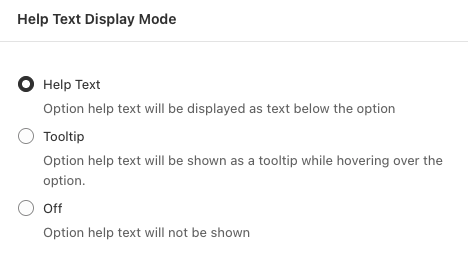
Display Modes
| Mode | Description | When to Use |
|---|---|---|
| Help Text | Option help text will be displayed as text below the option | Important information customers should see |
| Tooltip | Option help text will be shown as a tooltip while hovering over the option | Supplementary details to save space |
| Off | Option help text will not be shown | Don't want to display help text (text remains saved) |
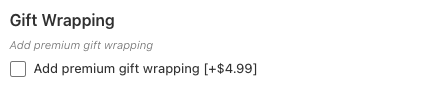
Help Text
The help text appears as small text directly below the option label.
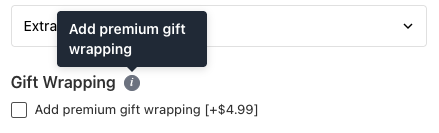
Tooltip
An info icon (ⓘ) appears next to the option label. Hovering over it reveals the help text in a tooltip.
Off
The help text is hidden from the storefront entirely. The text is still saved in your configuration and can be turned back on at any time.

Short Text and Short Text Group templates can override this
This setting applies store-wide, with two exceptions. A Short Text template and a Short Text Group template each have their own Help text display setting (Above, Below, Tooltip or Hidden). It replaces this one for every option using that template.
If help text on a Short Text or Short Text Group option isn't behaving the way this setting says it should, check whether the option has a template assigned. Options with no template follow this setting as normal.
Learn More
See Help Text documentation for details on adding help text to options.
How to Access
- Navigate to App Settings > Storefront Settings
- Open Help Text Display Mode
- Select the desired mode
- Click Save in the contextual save bar
Changes apply immediately to your storefront.