

Appearance
Earning Rules Block
Displays all the ways customers can earn points, motivating them to take action.
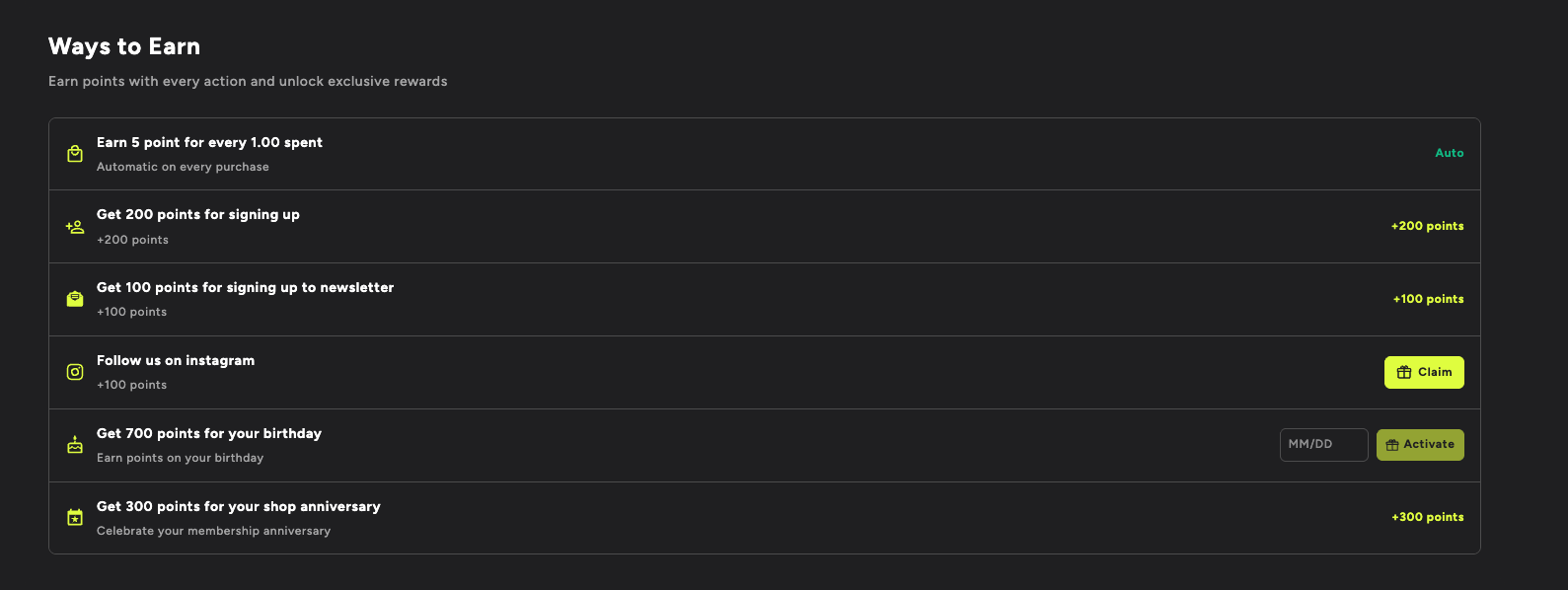
What It Shows
- Purchase Points - "Earn 5 points for every 1.00 spent" - labeled "Auto" (automatic on every purchase)
- Signup Bonus - "Get 200 points for signing up" - shows "+200 points" earned
- Newsletter Signup - "Get 100 points for signing up to newsletter" - shows "+100 points"
- Social Media - "Follow us on Instagram" - shows a green "Claim" button for manual action
- Birthday Reward - "Get 700 points for your birthday" - includes a MM/DD date input field and "Activate" button
- Anniversary - "Get 300 points for your shop anniversary" - shows "+300 points"
Each rule has a unique icon, description, subtitle, and either an automatic label, earned points display, or interactive call-to-action.
Customization Options
- Show/hide specific earning rules
- Custom earning rule labels
- Icon customization
- Layout options
- CTA button text and styling
- Progress indicator appearance
Best Placed On
Homepage, about page, or a dedicated "How to Earn" page to educate customers about your loyalty program.